
Libchalk
  • 0 Shopping Cart
  • Home
  • Store
    • Browse All
    • Hosting Services
    • Register a New Domain
    • Transfer Domains to Us
  • Announcements
  • Knowledgebase
  • Network Status
  • Contact Us
  • More
  • Account
    • Login
    • Register
    • Forgot Password?
  1. Portal Home
  2. Knowledgebase
  3. Cloudflare (cPanel)
  4. How to Check if Your Domain is Using Cloudflare in cPanel

  Categories

Backup/Restore
4
Basics of cPanel (Videos)
26
Cloudflare (cPanel)
9
CloudLinux (cPanel)
10
cPanel - Control Panel
24
cPanel Database Tutorials (Videos)
11
cPanel Domain Management (Videos)
10
cPanel Email (Videos)
5
cPanel FTP (Videos)
4
Databases
11
DirectAdmin
48
DNS - Nameservers
6
Domain Management
10
Email
17
FileZilla Client Tutorials (Videos)
5
FTP
9
Installing a Control Panel
6
Mail Filters & SPAM
8
Mobile
11
Mozila Thunderbird Tutorials (Videos)
6
Others
3
Outlook 2019 Tutorials (Videos)
6
PayPal
7
Plesk
47
Security
10
SiteWorx (Control Panel)
58
Softaculous
69
SolusVM
18
SolusVM Tutorials (Videos)
18
SSL
5
Virtualizor
19
Virtualizor (Videos)
19
WHM
18
WordPress
17
WordPress Tutorials (Videos)
17

  Categories

  Support

My Support Tickets
Announcements
Knowledgebase
Downloads
Network Status
Open Ticket

How to Check if Your Domain is Using Cloudflare in cPanel Print

  • 0

You can check the status of your Cloudflare in cPanel.

1. Log in to your cPanel account.

2. In the Software section, click on Cloudflare.

cPanel-Cloudflare-icon.gif

3. Click on Sign in Here to access your Cloudflare account.

Cloudflare-sign-in.gif

4. Click on Domains in the menu.

plesk-domains-menu.gif

5. Below Use Cloudflare, if your domain uses it, the status should be Active. If it is inactive, it means your domain is not using Cloudflare.
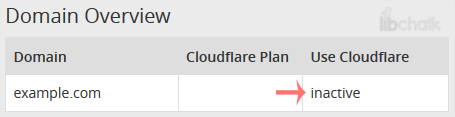
Cloudflare-status-active-or-inactive.gif


Was this answer helpful?

Related Articles

How to Access Cloudflare From cPanel You can access and manage Cloudflare in cPanel. Follow this tutorial to learn how to access... How to Enable Cloudflare on Your Domain in cPanel 1. Log in to your cPanel account. 2. In the Software section, click on Cloudflare.... How to Enable or Disable Cloudflare IPv6 Compatibility in cPanel 1. Log in to your cPanel account. 2. In the Software section, click on Cloudflare.... How to Enable or Disable Cloudflare's Always Online Feature in cPanel Did you ever notice that sometimes, when your server goes offline, Cloudflare keeps serving... How to Change Security Level of Cloudflare Domain in cPanel You can increase or decrease the Cloudflare security level from cPanel. Cloudflare has...
« Back

Powered by WHMCompleteSolution

  Support

My Support Tickets
Announcements
Knowledgebase
Downloads
Network Status
Open Ticket
  • Contact Us

Copyright © 2026 Libchalk. All Rights Reserved.


Loading...
Loading...
Choose language
العربية
Azerbaijani
Català
中文
Hrvatski
Čeština
Dansk
Nederlands
English
Estonian
Persian
Français
Deutsch
עברית
Magyar
Italiano
Macedonian
Norwegian
Português
Português
Română
Русский
Español
Svenska
Türkçe
Українська

Generate Password

Please enter a number between 8 and 64 for the password length